

Cold outbound fails for the same reason, over and over.
The rep opens their sales tool, filters by ICP, exports a list, drops it into a sequence, and hopes. The email hits an inbox where nothing about the sender or the moment is relevant to the recipient.
The best plays start with a signal, something the account just did, said, or shipped, and use that as the opener.
That difference matters more in 2026 than it did five years ago.
Cold email conversion rates have fallen below 1% in most B2B categories, according to public benchmarks. The only thing that consistently beats that is timing, and the only way to get timing right at scale is signals.
This is where Apollo has changed the game over the last year.
Apollo is a sales engagement platform with a large B2B contact and company database (275+ million people and 60+ million companies, per Apollo's public data), an email sequencer, workflow automation, and (since 2025) website visitor identification.
Two Apollo launches in the last year changed what's possible:
The Apollo AI Assistant, which builds workflows and sequences from plain-language prompts.
The Apollo MCP (Model Context Protocol) server, which lets Claude, Cursor, or any other AI client control Apollo directly.
Now you can run signal-based plays either from Apollo's UI or from Claude.
This post covers all five plays end to end, with the actual prompts you can copy into Apollo or Claude for each one.
What is signal-based outbound
A signal is a piece of data suggesting an account is closer to buying than they were yesterday.
It can be a page view, a job change, a form fill, a tech stack detection, or a job posting. Anything that indicates the account is actively working on the problem your product solves.
Traditional outbound sends the same sequence to a list of accounts, day after day. Signal-based outbound sends different sequences depending on what the account just did.
In signal-based programs we've built with clients, reply rates on triggered sequences typically run 2 to 4 times higher than baseline cold sequences.
Every play below turns one specific signal into a triggered sequence. Same idea, applied to five different triggers.
Play 1: Website Visitor Intent
The signal
A company from your target market visits your pricing page, your case studies, or your demo request page.
Why it works
A lot of website visitors leave before filling out a form.
Reverse-IP identification tools like RB2B, Warmly, and now Apollo's Inbound suite typically identify around 20-40% of B2B traffic as company-level visits. That means the majority of your ICP visitors would otherwise be invisible to you.
Apollo's Inbound suite (launched in late 2025) uses reverse-IP lookup and cookie matching to identify the company behind a visitor even when they don't fill anything out. Once you know the company, you can pull matching decision-makers from Apollo's contact database and reach out with a relevant message.
The trick is scoring by page.
Someone who reads a blog post is early in their research. Someone who lands on your pricing page has budget on their mind.
The two need different sequences.
Before you start
This play uses Apollo's website visitor tracking and a Slack integration.
Connect both before you run the steps below, and rank your high-value pages (pricing, demo, case studies) by intent level while you're there.
Running it in Apollo (with the AI Assistant)
Step 1: Build the routing workflow
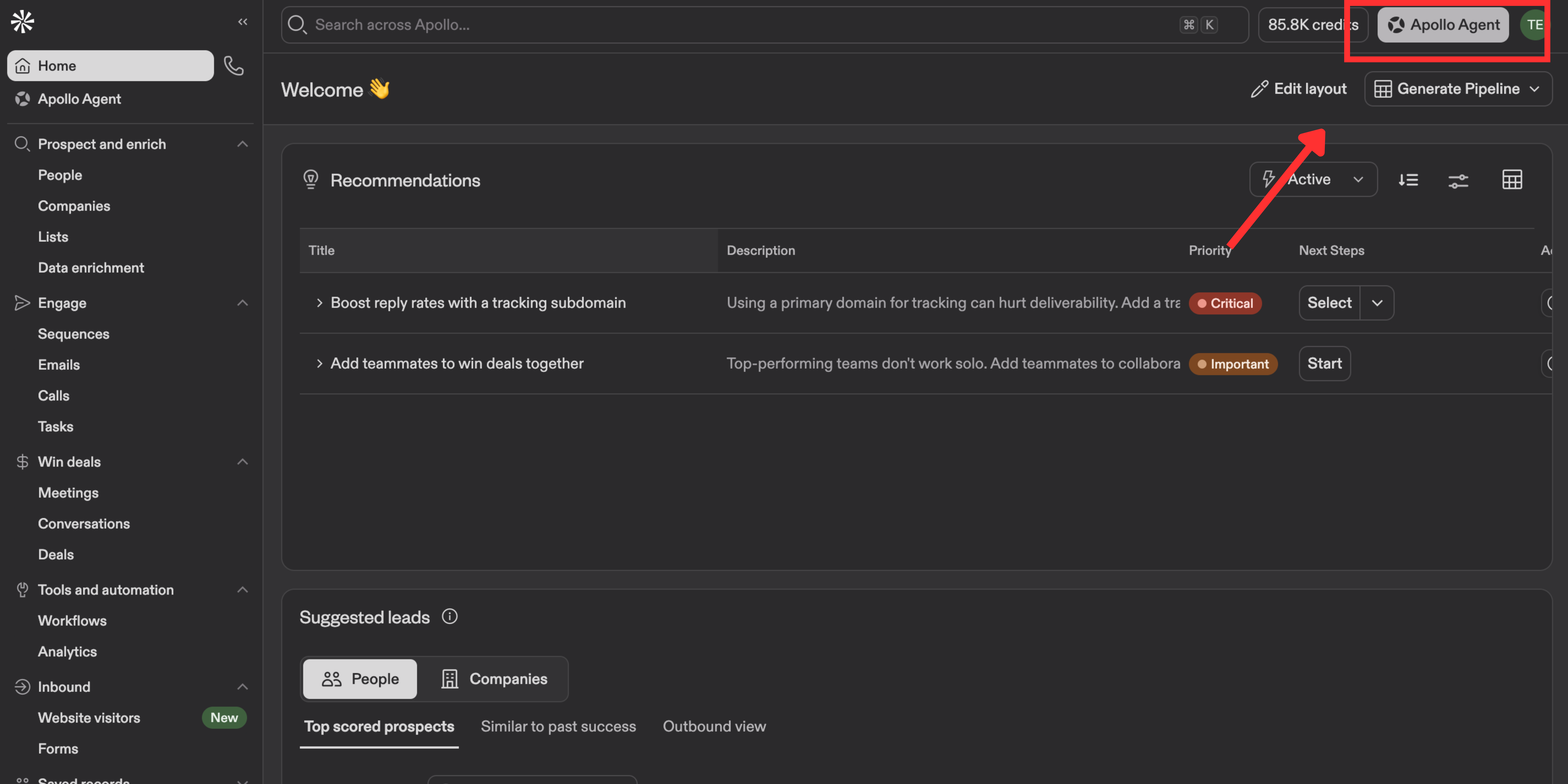
Open your Apollo dashboard. Click "Apollo Agent" in the top-right corner and paste this prompt:
Create a workflow called "Website Visitor Intent Router."

Trigger: When an account visits a tracked website page on [your-domain.com] within the last 30 days.

Add the visiting account to a list called "Website Visitors - ICP."
Send a Slack notification to the account owner with the company name and pages visited.

Update the workflow to split into two paths:
- Path A (High Intent): If the account has High Website Intent, add to list "High-Intent Website Visitors." Find contacts matching [VP Sales, Head of Revenue Ops, CRO] at the account and add them to sequence "[Your Product] - Hot Visitor."
- Path B (Medium Intent): If Website Intent is Medium, add to list "Nurture - Website Visitors." Find contacts matching the same titles and add them to sequence "[Your Product] - Warm Visitor."
Apollo generates the workflow. You can find it under Workflows in the sidebar.
Step 2: Create the two sequences
In the same Apollo Agent chat, paste:
Create a 3-step sequence called "[Your Product] - Hot Visitor" - short, direct, reference their site visit, meeting CTA. Steps spaced 2 days apart.
Repeat the prompt for a Warm Visitor sequence with a softer, educational tone.
Recommended email copy for the Hot Visitor sequence.
Running it via Claude (with the Apollo MCP)
Apollo tracks who visits your website.
Claude's Apollo MCP cannot see your website traffic directly. What it can do is take Apollo's list of visiting companies, find matching decision-makers, verify their emails, and enrol them into your Apollo sequences.
Step 1: Find your sequence IDs.
Search my active Apollo email campaigns using apollo_emailer_campaigns_search. Give me the unique ID codes for my "Hot Visitor" and "Warm Visitor" sequences.

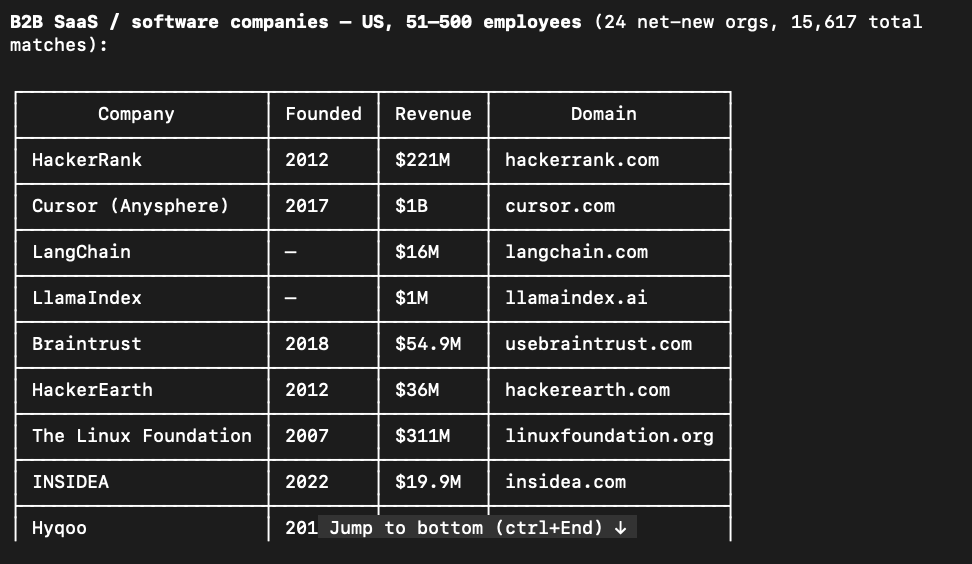
Step 2: Search matching ICP companies.
Use apollo_mixed_companies_search to find B2B SaaS companies in the United States that have between 51 and 500 employees.
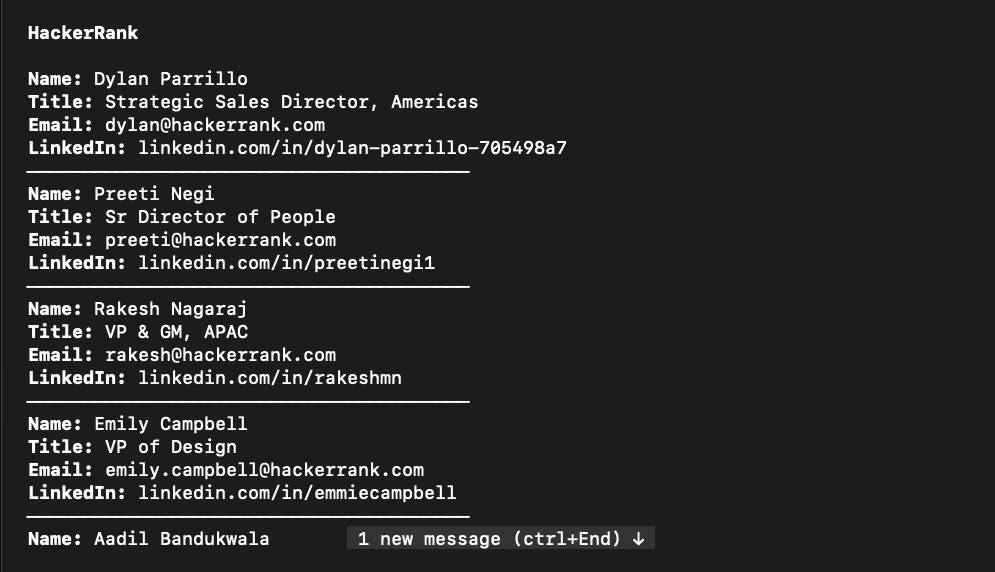
Step 3: Find and enrich decision-makers.
For the companies found, use apollo_mixed_people_api_search to find up to 5 people per company who hold "Director", "VP", or "C-Suite" roles. Then use apollo_people_match to fetch their verified emails and LinkedIn profiles.
Step 4: Enrol contacts into the sequence.
Take the verified contacts you just found and add them directly to my "Hot Visitor" sequence using the campaign ID you found in Step 1.
Once the Apollo workflow is live, this play runs itself. Every new website visitor that matches your ICP gets scored, enriched, and sequenced automatically. Review the lists weekly to tune your intent thresholds.
Screenshots and setup notes live in Play 1.
Play 2: Customer Alumni Outreach
The signal
Someone who used to work at your case study company is now working somewhere else.
Why it works
They may have never touched your product. But they were there while your customer got their result, which means they know the story from the inside.
This is one of the highest-converting cold openers in B2B because it does three things at once.
It shows you've done homework, which most cold emails don't.
It ties your value prop to a company they already trust.
It gives them an easy question to answer: "yes I remember that" or "no I left before that."
The catch is that Apollo's people search doesn't natively filter by "previously worked at [company]." You have to search for people whose employment history includes the company, which the AI Assistant handles well and the raw filters don't.
Running it in Apollo (with the AI Assistant)
Step 1: Find alumni and build the list
Open the Apollo Agent panel and paste:
Find people who previously worked at these companies: [list your case study companies, e.g., "Gong", "Outreach", "HubSpot"].

Filter the results to people now at companies with 50-500 employees in the B2B SaaS or Technology industries. Target titles: [VP Sales, Head of RevOps, Director of Marketing].

Once found, save all of these contacts to a new list called "Alumni - Target Case Studies."
Step 2: Build the outreach sequence
In the same chat, paste:
Create a 3-step email sequence called "[Your Product] - Alumni Play" using these rules:

- Email 1 (Day 1): Reference their time at their [Former Company]. Mention the specific result we helped that company achieve. Do not assume they used our product, just note they were there when it happened. Ask if they are seeing similar challenges at their [Current Company]. Keep it conversational.
- Email 2 (Day 4): Share the actual case study link from their former company. Frame it as "thought this might be relevant given your background at [Former Company]." No aggressive sales pitch, just provide the resource.
- Email 3 (Day 9): Direct call-to-action: "Worth a 15-minute conversation to see if what worked at [Former Company] could apply to your team at [Current Company]?"

Ensure the dynamic tags for {{contact.first_name}}, {{contact.past_company}}, and {{contact.company_name}} are correctly mapped in the templates.
Step 3: Automate ongoing alumni detection
Navigate to Workflows and paste:
Create a workflow called "Customer Alumni Auto-Detect."

Trigger: When a contact's job changes.
Constraint: Only trigger if their PREVIOUS company is on my "Customers" account list.

Action: If their NEW company matches my ICP (50-500 employees and B2B SaaS industry), automatically enrich the contact's email and add them directly to the sequence "[Your Product] - Alumni Play".
Running it via Claude (with the Apollo MCP)
The Apollo MCP can't search by past company. Build the alumni list in Apollo first using Step 1 above, then run these prompts in Claude.
Step 1: Enrich and confirm the alumni.
Use apollo_contacts_search to pull contacts from my saved list "Alumni - Target Case Studies." Run apollo_people_match on each to return verified email, LinkedIn, current title, location, and full employment_history. Flag anyone whose employment_history confirms they worked at [case study company] and show their tenure. List the matching contacts with their Apollo person IDs.
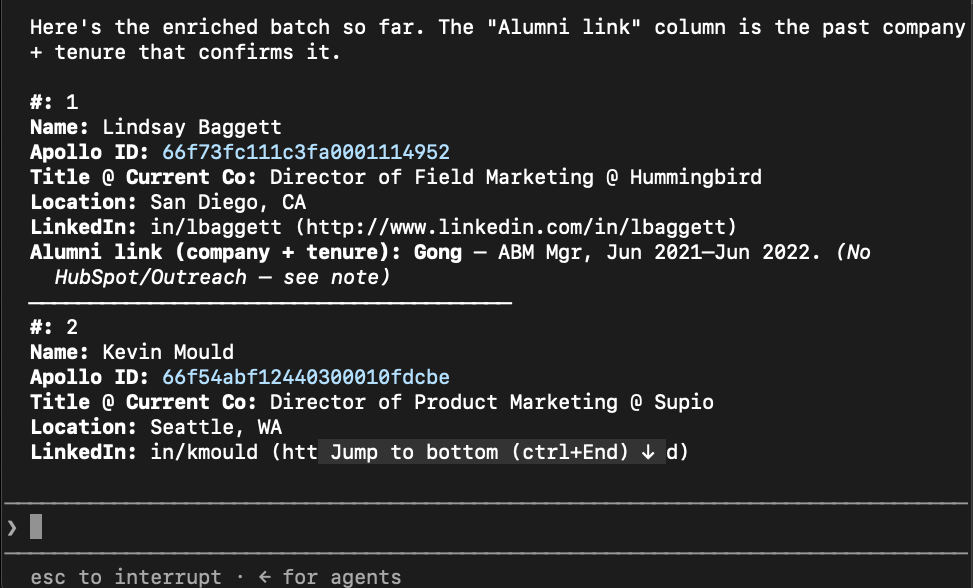
Step 2: Find the sequence ID and enrol.
# Find the sequence ID
Use apollo_emailer_campaigns_search to find the sequence named "[Your Product] - Alumni Play" and return its ID.

# Enrol
Add these Apollo contacts [paste person IDs] to the sequence with ID [paste sequence ID]. Before enrolling, list every person you're about to add with their name, company, and email so I can confirm. Do not enrol until I reply "go."
Set up the Apollo Workflow above to catch future alumni automatically. Run the Claude prompts monthly to catch anyone the job change trigger missed.
Screenshots and setup notes live in Play 2 .
Play 3: Inbound-to-Outbound Multithreading
The signal
Someone at a target company fills out your demo form.
Why it works
B2B buying decisions typically involve six or more stakeholders across the buying committee, per Gartner's ongoing research into B2B buying groups. One demo request is one person on that committee.
If you only sequence the person who filled the form, you're leaving five or more people cold on a deal that's already showing intent.
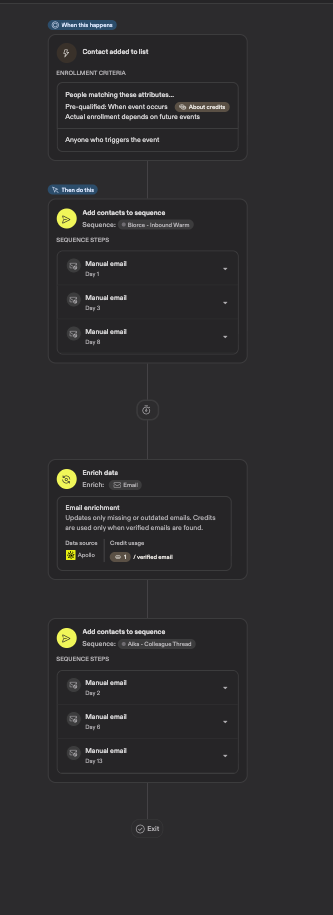
The play turns one inbound lead into a coordinated push across the buying committee.
The original lead gets a "thanks for your interest" track. Their four to five colleagues get a "your teammate was looking at us" track. The colleague track is warm before the first email lands, because the recipient's teammate just researched you and there's likely an internal meeting about it soon.
Running it in Apollo (with the AI Assistant)
Step 1: Build the Inbound Warm sequence for the lead
Open the Apollo Agent panel and paste:
Create a 3-step email sequence called "[Your Product] - Inbound Warm":

- Email 1 (Day 0): Reference their inbound demo request. Acknowledge what caught their eye. Share a relevant resource or product guide. Keep the tone helpful and warm.
- Email 2 (Day 2): Value-add follow-up sharing a case study or specific ROI metrics relevant to their space.
Step 2: Build the Colleague Thread sequence for the buying committee
In the same chat, paste:
Find VP and Director-level contacts at [company_name] in [Sales / RevOps / Marketing - adjust to your ICP]. Exclude [inbound_lead_name]. Enrich each with verified email and LinkedIn URL.

Create a 3-step email sequence called "[Your Product] - Colleague Thread":
- Step 1 (Day 1): "Your colleague [inbound_lead_name] on the [department] team was recently looking at [your product]. Given your role, thought you'd want visibility."
- Step 2 (Day 4): Share a persona-specific insight (for VP Sales: pipeline impact; for RevOps: integration angle).
- Step 3 (Day 7): Direct ask - "Would it make sense to loop you into the conversation [inbound_lead_name] started?"

Enrol all found stakeholders in this sequence.
Step 3: Automate the multi-threading loop
Navigate to Workflows and paste:
Create a workflow called "Inbound Multithreader."

Trigger: When a contact is added to my "Inbound Leads" list.

Step 1: Add the contact to the "[Your Product] - Inbound Warm" sequence.
Step 2: Wait 1 day.
Step 3: Find VP and Director-level contacts at the same company. Enrich with verified email.
Step 4: Add those stakeholders to the "[Your Product] - Colleague Thread" sequence.
Running it via Claude (with the Apollo MCP)
Step 1: Find your sequence IDs and pull the lead's context.
Use apollo_emailer_campaigns_search to find the structural IDs for my sequences named "[Your Product] - Inbound Warm" and "[Your Product] - Colleague Thread". Second, use apollo_people_match to extract the first name and company domain for the inbound lead: [[email protected]].
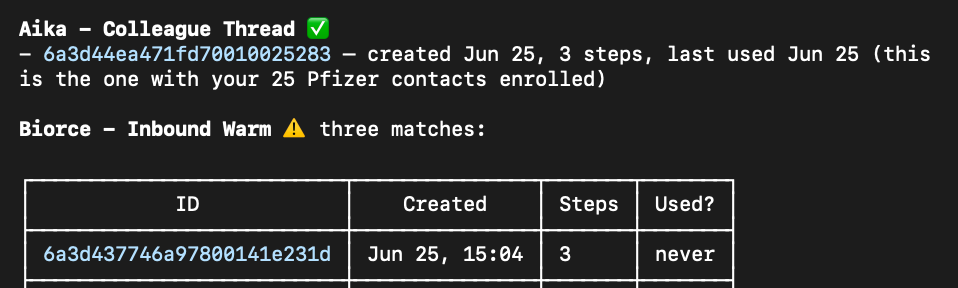
Step 2: Find the buying committee at the same company.
Using the company domain extracted in Step 1, run apollo_mixed_people_api_search to discover up to 4 contacts holding "Director" or "VP" titles. Exclude the original lead's email. Enrich them using apollo_people_match to pull their verified email strings.
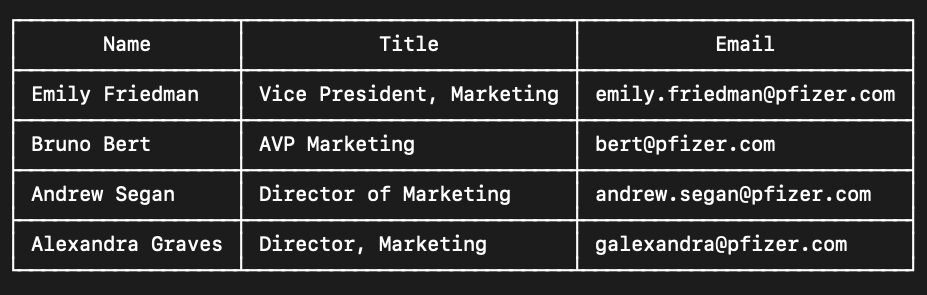
Step 3: Enrol each group into the matching sequence.
Enrol the original inbound lead into the "Inbound Warm" sequence ID. Then enrol the discovered stakeholders into the "Colleague Thread" sequence ID, passing the original lead's first name directly into the email template text block.
Why the 24-hour wait matters. The lead needs a chance to reply to the first email before you widen the net. If they book a meeting within a day, your AE can bring the colleagues in through the normal deal process instead of through outbound.
Common mistake. Sending the colleague thread before the original lead's first email lands. If your VP of Sales gets an outbound email about their teammate's demo request before the teammate has heard from you, it looks disorganised.
Screenshots and setup notes live in Play 3.
Play 4: Competitor Tech Stack Displacement
The signal
A company runs your competitor's tool.
Why it works
These prospects have already been sold the category. They wrote a business case, got budget approval, ran a procurement process, and picked your competitor.
They know what the tool is for. They know what it costs. You're not selling them on the idea, you're selling them on switching.
Reply rates typically run 2 to 3 times higher than net-new category outreach, because the buyer's education is already done. The catch is that most displacement emails read like attack ads, which puts the reader on the defence immediately.
The best displacement openers do the opposite.
They acknowledge what the prospect is using today, then introduce yours as a different approach rather than a better one.
Running it in Apollo (with the AI Assistant)
Step 1: Build the displacement sequence
Open the Apollo Agent panel and paste:
Create a 3-step email sequence called "[Your Product] - Displacement - [competitor_name]".

Step 1, the acknowledgment (Day 0):
"Hi [first_name], noticed [company_name] is running [competitor_name] for [use_case]. How's it working for your team at this point? We work with a lot of teams who started on [competitor_name] and hit [common_pain_point] around the [company_size] stage."

Step 2, the proof point (Day 3):
"Not trying to bash [competitor_name], it's solid for [what_competitor_does_well]. But [your_product_name] was built for [key_differentiator]. [Customer_name] switched last quarter and saw [specific_result]."
Step 2: Find target companies and enrol contacts
In the same chat, paste:
Run a competitor displacement campaign.

1. Target companies: search for companies currently using [competitor_name] (e.g. "Outreach", "Salesloft", "HubSpot Sales Hub"). Filter by:
   - Company size: 50-1,000 employees
   - Industry: B2B SaaS, Technology, Financial Services
   - Revenue: $5M-$100M
   - Limit: 100 companies
   Save them to a list called "Displacement - [competitor_name]".

2. Decision makers: at each company, find 1-2 contacts matching:
   - Titles: VP of Sales, Head of Revenue Operations, Director of Sales Enablement, CRO
   - Seniority: Director and above
   Enrich each with verified work email and LinkedIn URL.

3. Enrol all enriched contacts into the "[Your Product] - Displacement - [competitor_name]" sequence. Tag each with "Displacement - [competitor_name]".

Run this for [competitor_name] = "Outreach" first. I'll duplicate it for other competitors afterward.
Running it via Claude (with the Apollo MCP)
Step 1: Find your sequence ID.
Search my active Apollo email campaigns using apollo_emailer_campaigns_search. Give me the unique ID code string for my "Displacement - Outreach Users" sequence.
Step 2: Find companies using the competitor tool.
Use apollo_mixed_companies_search to find companies in the United States with 51 to 500 employees that are currently using the technology "outreach" and are tagged with "SaaS" or "B2B". Set per_page to 100.
Step 3: Find decision-makers at those companies.
For each company domain found in the previous step, use apollo_mixed_people_api_search to find up to 3 people per company who hold "director", "vp", or "c_suite" seniorities.
Step 4: Enrich the contacts.
Take the person IDs found in the previous step and use apollo_people_match to fetch their verified work emails, LinkedIn URLs, and employment history.
Step 5: Enrol into the sequence.
Take the verified contacts you just found and add them directly into my displacement sequence using the campaign ID found in Step 1.
Screenshots and setup notes live in Play 4.
Play 5: Hiring Signal Pipeline
The signal
A company posts a job for a role your product supports or replaces.
Why it works
A job posting is one of the loudest buying signals in B2B. Companies don't post roles they don't need.
When they post a role, they've admitted three things at once.
They have a specific problem they can't solve today.
They have budget approved for it.
They have a timeline: before the new hire ramps up.
New hires typically take three to six months to reach full productivity in a B2B GTM role, based on ramp-time data most sales orgs track internally.
If your product can solve the same problem faster, you're competing against a multi-month gap the company is about to feel.
The play targets two people:
The hiring manager, because they own the outcome the new hire is meant to deliver.
The budget holder (CRO, VP Revenue), because they approved the hire and can redirect the budget.
Running it in Apollo (with the AI Assistant)
Step 1: Build the two sequences
Open the Apollo Agent panel and paste:
Create two email sequences.

Sequence A, "[Your Product] - Hiring Signal - Manager" (1 step):
- Email 1 (Day 1): Reference the specific job posting by title. Acknowledge they're scaling. Position [your product] as a way to speed up the new hire's ramp or get more from the existing team. 4 sentences max.

Sequence B, "[Your Product] - Hiring Signal - Executive" (3 steps):
- Email 1 (Day 1): Reference the hiring push. Position [your product] as a way to hit targets before the new hire is fully ramped.
- Email 2 (Day 5): Customer story, a similar company hit [specific metric] using [your product] instead of adding headcount. 3 sentences max.
- Email 3 (Day 10): Direct ask, "Would a 15-minute call make sense to see if [your product] could help before the new hire is fully ramped?"
Step 2: Find hiring companies and enrol contacts
In the same chat, paste:
Search for companies with active job postings for [role, e.g. "SDR", "Sales Development Representative", "BDR"]. Filter to:
- Company size: 50-1,000 employees
- Industry: B2B SaaS
- Location: [your target geos, e.g. United States, United Kingdom]
- Job posted within the last 30 days

Save the matching companies to a list called "Hiring Signal - [role]".

For each company, find two contacts:
- Hiring manager: titles VP of Sales, Director of Sales, Head of Sales Development. Seniority Director and above.
- Budget holder: titles CRO, SVP Revenue, VP Revenue Operations. Seniority VP and above.

Enrich all contacts with verified email and LinkedIn URL.

Enrol the hiring managers in "[Your Product] - Hiring Signal - Manager".
Enrol the budget holders in "[Your Product] - Hiring Signal - Executive".
Tag every contact with "Hiring Signal - [role]".
Step 3: Make it recurring
Paste:
Save the company search above as a dynamic list named "Hiring Signal - [role]" so new companies get added automatically as they post the role.

Create a workflow called "Hiring Signal Router."

Trigger: when a company is added to the "Hiring Signal - [role]" list.

Action: find the hiring manager and the budget holder at that company, enrich both with verified email, then enrol the manager in "[Your Product] - Hiring Signal - Manager" and the budget holder in "[Your Product] - Hiring Signal - Executive".
Running it via Claude (with the Apollo MCP)
Step 1: Find your sequence IDs.
Search my active Apollo email campaigns using apollo_emailer_campaigns_search. Find and show me the unique ID codes for my sequences named "Hiring Signal - Manager" and "Hiring Signal - Executive".
Step 2: Find companies with active job postings.
Use apollo_mixed_companies_search to find B2B SaaS companies in the United States with 51 to 1,000 employees that have active job openings for "SDR", "Sales Development Representative", or "BDR". Set per_page to 100.
Step 3: Find the hiring managers.
For the company domains found in Step 2, run apollo_mixed_people_api_search to find up to 3 people per company who hold "director" or "vp" seniorities.
Step 4: Find the budget holders.
For those same company domains, run a separate apollo_mixed_people_api_search to find up to 2 people per company who hold "c_suite" seniorities.
Step 5: Enrich all contacts.
Take the person IDs found in Step 3 and Step 4 and use apollo_people_match to fetch their verified work emails, LinkedIn profiles, and employment history.
Step 6: Enrol each group into the matching sequence.
Enrol all the enriched Director and VP contacts from Step 3 into the "Hiring Signal - Manager" sequence ID. Then enrol all the C-Suite contacts from Step 4 into the "Hiring Signal - Executive" sequence ID.
The dynamic list auto-refreshes as new job postings appear. The workflow routes each contact to the right sequence based on their title. The play runs continuously without manual re-searching.
Screenshots and setup notes live in Play 5.
Two ways to run any of these
Every one of the five plays has the same two-track option.
The Apollo AI Assistant version uses plain-language prompts inside Apollo. You describe what you want. It builds the sequence, the workflow, and the enrolment logic.
Best for teams that live inside Apollo and want everything visible in the UI.
The Claude MCP version uses Apollo's MCP from Claude Code or Claude Desktop. Claude searches, enriches, and enrols into sequences you've already built.
Best for teams already using Claude for other GTM work who want to fold Apollo into that flow. It also makes multi-tool workflows possible. Claude can pull data from Apollo, cross-reference it with HubSpot, enrich it via Findymail, and enrol the result, all in one prompt.
Both versions produce the same outcome. The choice is about where you'd rather spend your time.
Conclusion
Cold outbound isn't dead. It's just been outgrown by teams that noticed a simpler truth.
Every account gives you at least one signal before they're ready to buy. Someone visits the pricing page. Someone changes jobs. Someone fills out a form. Someone shows up in a tech stack scrape. Someone posts a role.
If you build a play that catches each of those moments, you don't need to spray. You just need to route.
That's what these five plays are.
Frequently asked questions
What is signal-based outbound?
Signal-based outbound is a sales motion that sends outreach only after an account takes an action suggesting they might be closer to buying. Actions include page views, job changes, form fills, tech stack detections, and job postings. The result: sequences that reference a real event, not a generic ICP fit.What is the Apollo AI Assistant?
The Apollo AI Assistant is Apollo's built-in agent that turns plain-language prompts into workflows, sequences, and searches inside Apollo. You describe what you want, and it configures the sequence steps, filters, and enrolment logic without you touching the UI.What is the Apollo MCP?
The Apollo MCP (Model Context Protocol) is a server that connects Apollo to AI clients like Claude Code, Claude Desktop, and Cursor. It lets those tools search Apollo's database, enrich contacts, and enrol them into sequences you've already built inside Apollo.Which of these five plays should I build first?
Play 1 (Website Visitor Intent) and Play 3 (Inbound-to-Outbound Multithreading) usually pay back the fastest, because both use signals that are already sitting in your stack. If you have a website with traffic and a demo form with fills, you already have the data.Do I need Apollo to run these plays?
The plays are written against Apollo specifically because it combines contact data, sequencing, workflows, and (recently) website visitor identification in one product. You can run the same patterns in Outreach, Salesloft, or HubSpot with additional glue, but Apollo removes most of the integration work.What's the difference between the Apollo AI Assistant version and the Claude MCP version?
The Apollo AI Assistant builds the workflow inside Apollo from plain-language prompts. The Claude MCP version uses Apollo's MCP so Claude can search, enrich, and enrol contacts on your behalf from your code editor or terminal. Both produce the same outcome. The choice is about where you'd rather spend your time.