Skip to content

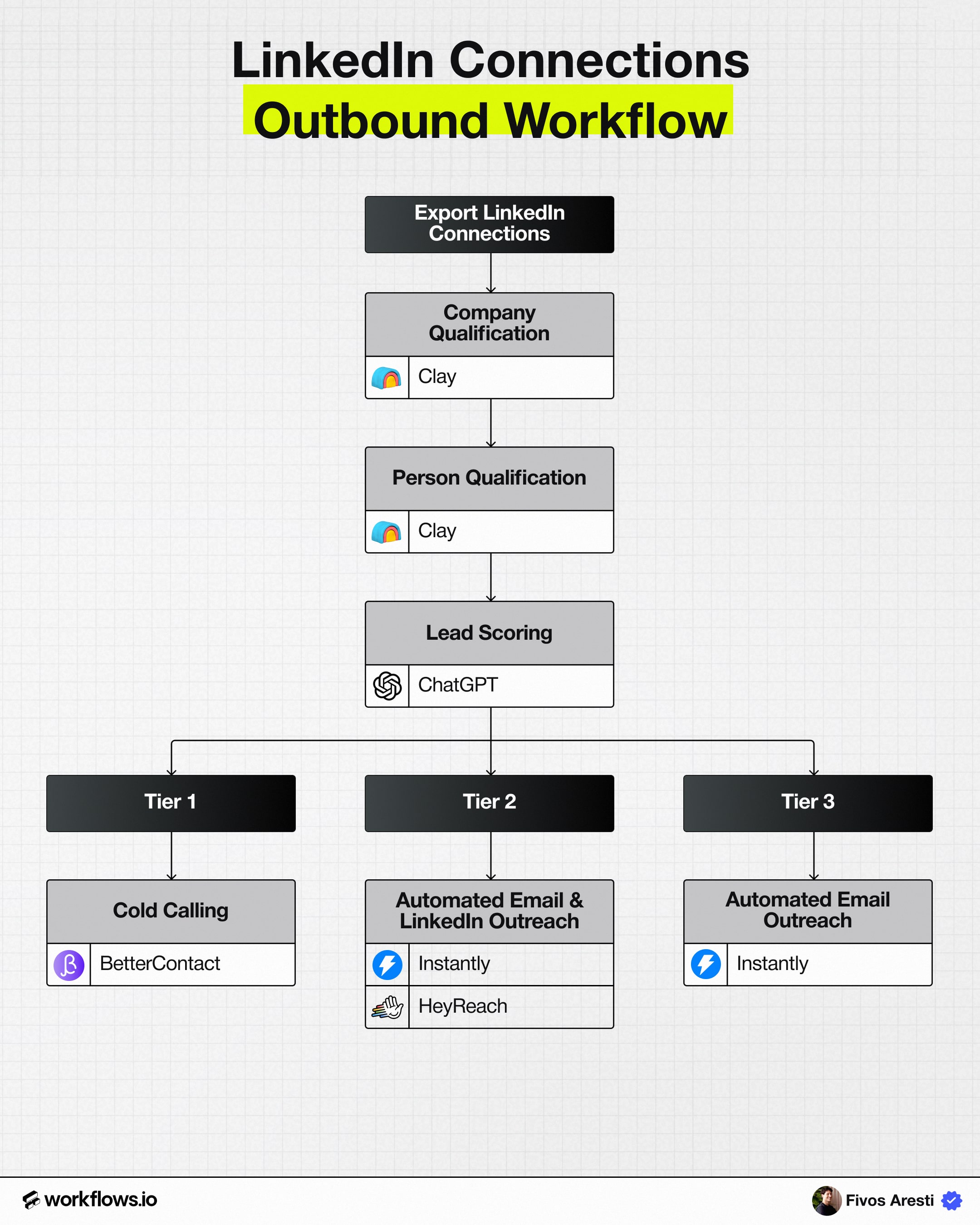
The Founder’s Connections Playbook

Tools used

Download playbook

By clicking download you subscribe to our marketing communications.

Fivos Aresti
Fivos Aresti

How it works

Step 1: Export Founder’s LinkedIn Connections

Start by exporting the founder's LinkedIn connections.

How to export LinkedIn connections:

  1. Click the Me icon at the top of the LinkedIn homepage.
  2. Select Settings & Privacy.
  3. Open the Data Privacy section from the left sidebar.
  4. Under How LinkedIn uses your data, click Get a copy of your data.
  5. Select Download larger data archive, which includes connections.
  6. Click Request archive.
  7. Download the file from the link sent to your primary email address.

After export:

  • Extract the connections CSV file.
  • Upload the CSV into Clay.
  • Use this list as the warm starting point for outbound.

Share

The Founder’s Connections Playbook
Scroll to zoom in and out, drag to navigateUse 2 fingers to drag, zoom in and out
Book yourstrategy call

By subscribing, you agree to our Privacy Policy and receive updates.

Navigate

HomeHomeHomeWorkflowsWorkflowsWorkflowsToolverseToolverseToolverseCustomersCustomersCustomers

Resources

BlogBlogBlogCareersCareersCareersGTM GlossaryGTM GlossaryGTM GlossaryLinkedIn post previewerLinkedIn post previewerLinkedIn post previewerWorkflows APIWorkflows APIWorkflows API

Subscription Services

LinkedIn ContentLinkedIn ContentLinkedIn ContentAutomated OutboundAutomated OutboundAutomated OutboundAI RevOpsAI RevOpsAI RevOps

Sprint Projects

ABM ProgramABM ProgramABM ProgramAI RevOpsAI RevOpsAI RevOpsEnterpriseEnterpriseEnterprise
Check out our GTM workflows

Explore AI Summary

Partner 1Partner 2Partner 3Partner 4Partner 5Partner 6Partner 7Partner 8Partner 9
Workflows.io © 2026Privacy PolicyTerms of Use